

If you’re reading this, you’re looking for a way to get Submagic for free. Is it possible? Let’s find out in this article. Let’s go !
Try Submagic for free
Submagic is an online program that lets you subtitle your short videos with AI in just a few clicks.
As with most SAAS products, you can try it out for free. To do so, create an account or log in via Google. You can then create a project and upload a video of less than 90 seconds. After a few moments, the software will have generated your subtitles. You can modify them if necessary, customize their appearance, and preview the final rendering of your video.
The only problem is that you won’t be able to download the final version of this video without a Submagic subscription.
The only way to avoid this limitation would be to record your screen. The problem is that the quality will be mediocre, and you won’t be able to remove the Submagic watermark that appears in the middle of the video…
But no, Submagic isn’t free…
So no, as you may have gathered, Submagic isn’t free.
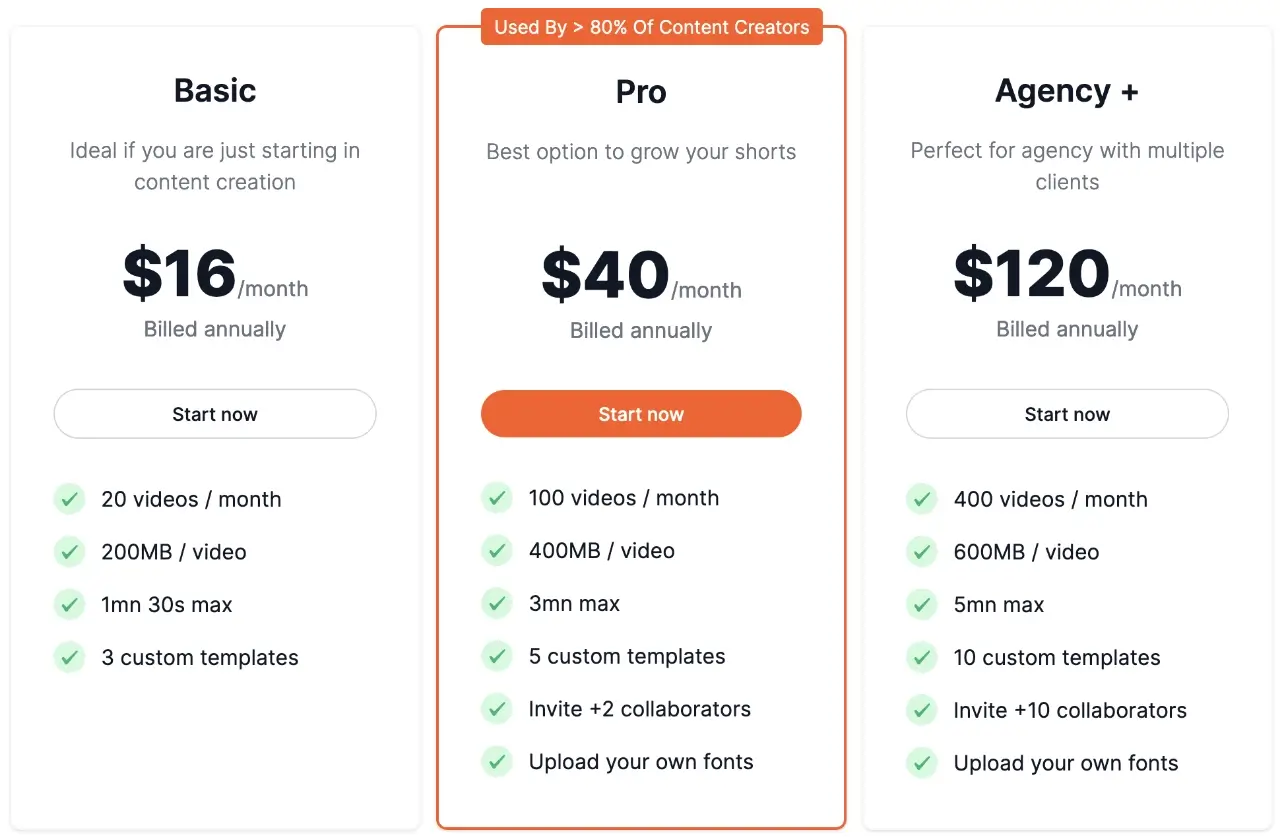
To be able to upload your subtitled videos and publish them on your social networks, you’ll need to start by taking out a subscription. Submagic offers 2 subscriptions: Basic and Pro.
- Basic is for those who need to edit around twenty videos a month. These should not exceed 90 seconds.
- Pro allows you to subtitle 100 videos each month, up to 180 seconds in length.
- The Agency + plan enables 400 videos to be subtitled every month.
If you decide to subscribe to Submagic, here’s the -10% discount coupon for Submagic that I’ve negotiated especially for you: SAVE10.
For your information, you can also benefit from an additional -20% by choosing the annual subscription.