
You’re about to sign up for a SendShort subscription and when you placed your order, you noticed that you could add a promotional code to benefit from a discount.
In this article, I’m sharing a SendShort promo code I’ve specially negotiated for you. Let’s go !
SendShort promotional code
Take advantage of a 10% discount on your SendShort subscription by entering promo code SAVE10 when placing your order.
How to use this SendShort promotional code?
- Copy the code SAVE10.
- On the order form, click on “Add a promotional code”.
- Paste the code SAVE10 and click on “Apply”.
- Your 10% discount has been activated.
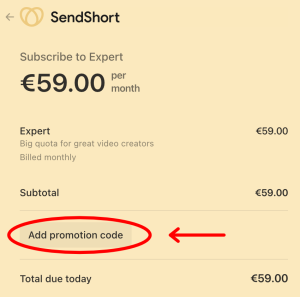
SendShort prices with and without coupon code
| Subscription | Pro | Advanced | Expert |
| Monthly payment | $19/month | $29/month | $59/month |
| Monthly payment with code SAVE10 | $17.1/month | $26.1/month | $53.1/month |
| Annual payment | $15/month | $23/month | $47/month |
| Annual payment with code SAVE10 | $13.5/month | $20.85/month | $42.3/month |
As is often the case, SendShort offers a special rate for annual subscriptions (20% discount). You can add the SAVE10 discount coupon to get an even better deal.
What is SendShort and what does it do?
SendShort is an online program with 2 main functions:
- Generate shorts from long videos in horizontal format.
- Add subtitles automatically to your Shorts to make them more engaging and improve the viewing time of your content. These subtitles can be corrected if necessary. You can also add emojis and modify their appearance.
Discover all the benefits and features of this tool in my SendShort review.