
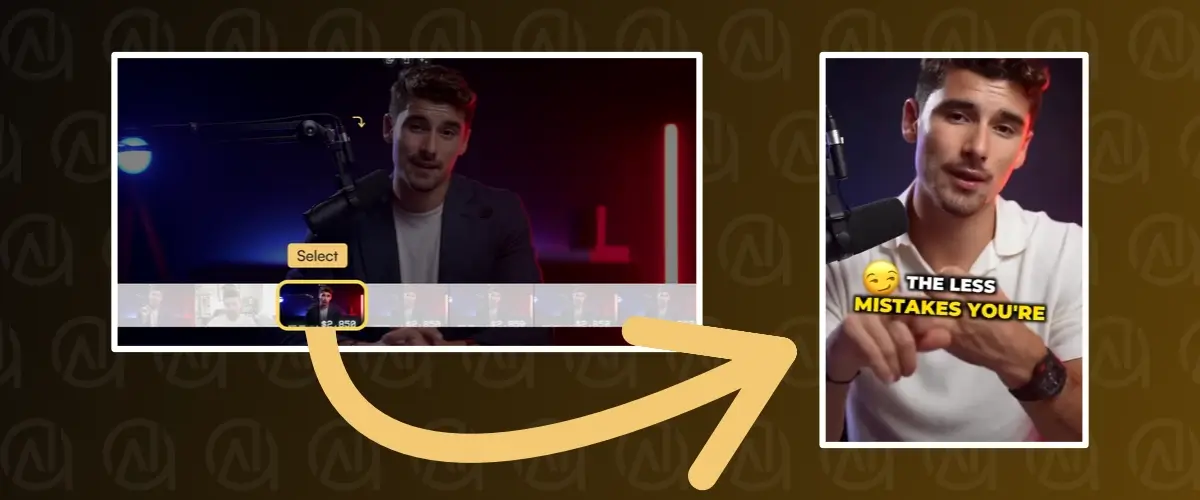
Do you have long videos at your disposal, such as YouTube videos, and want to turn them into short videos (Shorts) to publish on other social networks like YouTube Shorts, Instagram or Tiktok? You’ve come to the right place!
In this article, I explain how I recycle my long-form content and turn it into impactful Shorts that can go viral.
Recycling your long videos is essential
Video is great, but if you’re used to producing it, you know how much work it takes. Especially when it comes to long, horizontal videos like those found on YouTube.
Recently, TikTok has democratized the video format on social networks. But not just any videos. Short-form videos, also known as Shorts videos. These are videos in story format (9:16 ratio) that generally last from a few dozen seconds to a few minutes.
TikTok’s competitors, notably Instagram, were quick to react and also implemented this new format, giving it maximum visibility.
In concrete terms, if you’re a video content creator, you can no longer do without the Short format to develop your audience, as it has become so indispensable.
The problem is, you may not have the time to shoot additional videos, let alone edit them…
But that’s no longer a problem! If you already have video content, for example on your YouTube channel, you can use it and recycle it. The idea is to capitalize on this old content and give it a new lease of life, all in record time thanks to the tool I’m going to introduce to you here.
SendShort, the AI tool that creates shorts from long videos
SendShort is an online program with one aim: to save you time. It allows you to transform a long video (in horizontal format) into a multitude of short videos in vertical format. All in just a few minutes, without the need for a video editor. Save time, money and subscribers!
After cropping and adapting the video format, SendShort lets you subtitle it automatically. You know, with those dynamic, animated and colorful subtitles we’re seeing more and more on social networks. The aim is to captivate the viewer as much as possible, to increase viewing time and the viral potential of your Short!
In the rest of this article, I’ll take you through the main features of this software.
If you’ve seen enough and want to try it out for yourself, SendShort offers a free trial version so you can make up your own mind.
How do I use SendShort’s artificial intelligence?
The first step is to create a SendShort account. It’s free.
1 – Upload a long video
There are two ways to upload your source video:
- Upload directly from your computer.
- Upload directly from a YouTube URL.
Uploaded videos must be less than 1 GB in size and less than 2 hours long.
Don’t forget to select the video’s language so that you can generate subtitles.

For this example, I’ve added a video directly from a YouTube link. Uploading is quick, but will depend on the length of the video.
2 – Selecting the best moments to turn into Shorts
Once your video is online, you’re taken to a sort of timeline where you can select the best moments of the video, those you want to turn into Shorts. You can launch the video to identify and adjust the moments you want to keep.

You decide whether you want to create several Shorts from a single video. For example, if you’ve filmed a Podcast and want to recycle it, chances are you can make several Shorts, one for each key moment. Then all you have to do is publish them on the various platforms that accept such short content, including YouTube Shorts, Instagram with its Reels and TikTok.
3 – Crop Short
SendShort has a feature that automatically crops your short videos. This is useful if you have several cameras and different shots on the same video. I like the fact that you can correct the cropping manually if it’s not perfect.

4 – Automatic video subtitling
Last step. SendShort will automatically subtitle our Short thanks to its artificial intelligence. As with cropping, you can intervene manually if necessary and add your own subtitles (correcting errors, line breaks, adding/removing smiley faces).
Beyond the subtitles generated, it’s worth noting the dynamism they bring to the video. They make it more attractive, so viewers are more likely to watch it in its entirety. As you can see, Send Short highlights the main keywords and also adds animated smileys.

Here, you can also change the appearance of subtitles while previewing the result live. Here are just a few of the parameters you can play with: position, size, font, outlines, colors, style, etc.
How much does it cost?
As a reminder, SendShort offers a free trial version for you to try out.
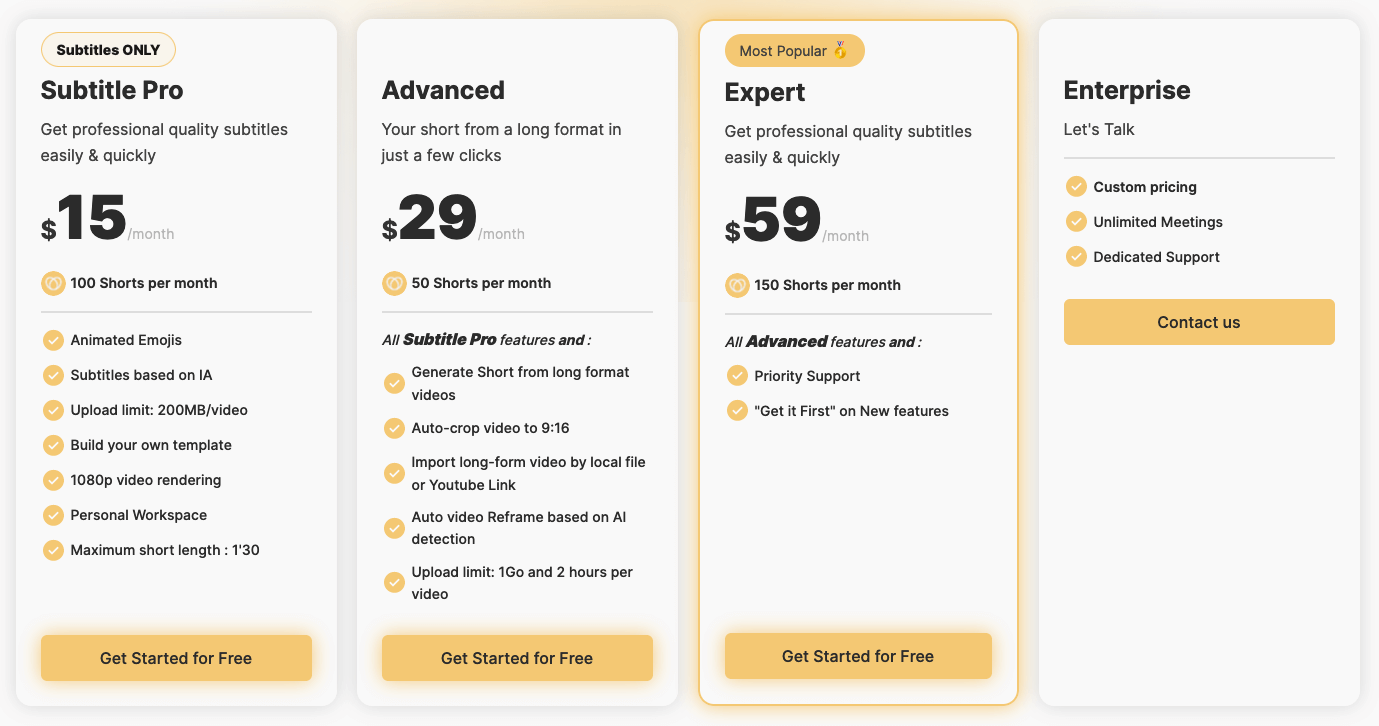
4 subscription-based packages are available:
- The Subtitle Pro formula: please note that this formula is limited to subtitling videos and is therefore not suited to your needs if you’re here to transform long videos and shorts.
- The Advanced package unlocks all the software’s features. However, it is limited to the production of 50 Shorts per month.
- The Expert package allows you to produce 150 Shorts per month.
- For more extensive needs, you’ll need to contact support and opt for the Enterprise package, for which you’ll receive personalized pricing.
For your information, we’ve negotiated a promotional code (-10%) valid for all SendShort subscriptions. To take advantage of it, copy the code SAVE10 and paste it on the order form.
Conclusion
Today, if you’ve produced long videos, reusing them to publish on other social networks has never been easier. The advantage of this is that you can capitalize on old content and reuse it to grow your audience wherever Shorts are in vogue, including TikTok, Instagram and Youtube Shorts.
Maybe you’ve already thought about recycling this content, but didn’t have the desire or the means to re-edit it to 9:16 format…
Today, that excuse is no longer valid!
As we saw in this article, SendShort does all the work for you, turning any long video into cropped and subtitled shorts. All in just a few clicks, thanks to artificial intelligence that does (almost) all the work for you.
Try SendShort for free and get 10% off with the promo code SAVE10 that we’ve negotiated especially for you.